How To Find Your Other Search Terms in Google Ads
If you’ve used Google Ads in the past five years, there’s a good chance you were charged for clicks categorized as “Other Search Terms” — vague, undisclosed queries that Google won’t show you. This page will walk you through how to locate those charges in your Google Ads account, take a screenshot, and send it to our legal team for review. It only takes a few minutes, and there’s no cost to find out if you may qualify for legal action.
Step 1: Log into ads.google.com and sign in to your account.
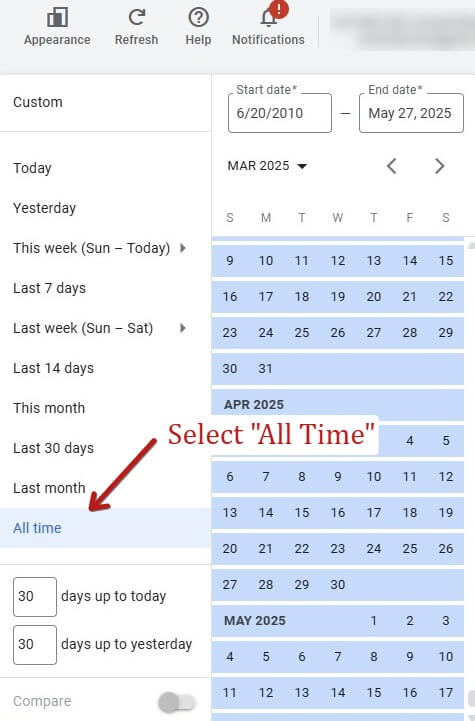
Step 2: In the top-right corner, click the date selector and choose “All time” or select a custom range covering the last 5 years.
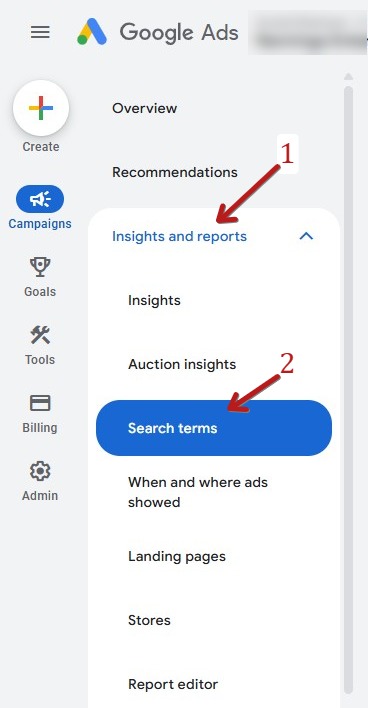
Step 3: In the left-hand menu, click Insights and reports and then Search Terms. With older versions of Google Ads you may need to start with “Keywords”, then select “Search terms.”
Step 4: Scroll down to the bottom of the list. You’ll see a row labeled “Other search terms.”
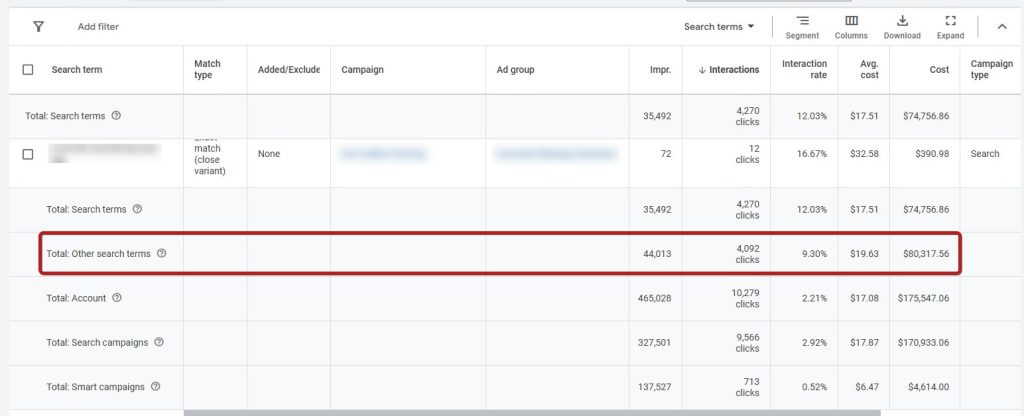
Step 5: A screenshot showing the “Other search terms” row, your account name, and date range is perfect if you’re submitting info to our legal team.
How to Take a Screenshot of Your “Other Search Terms” Row
On Mac:
-
Open your Google Ads account and scroll to the “Other search terms” row.
-
Press Shift + Command (⌘) + 4
-
Your cursor will turn into a crosshair — click and drag to highlight the part of the screen you want to capture.
-
The screenshot will automatically save to your desktop.
On Windows:
-
Open your Google Ads account and scroll to the “Other search terms” row.
-
Press Windows Key + Shift + S
-
Your screen will dim — click and drag to highlight the section you want to capture.
-
The image is copied to your clipboard — open Paint or your email and press Ctrl + V to paste it, then save the file.

Disclaimer: This is attorney advertising. Wites & Rogers, P.A. is a Florida law firm. Attorneys are licensed in Florida. Cases may be referred to other attorneys if appropriate. No results are guaranteed. Viewing this site or contacting us does not create an attorney-client relationship. Full Legal Disclaimer Here.
Disclaimer: This is attorney advertising. Wites & Rogers, P.A. is a Florida law firm that represents clients throughout the United States. Our lawyers are licensed in Florida, California, Georgia and South Carolina. We co-counsel cases with lawyers throughout the country. No results are guaranteed. Viewing this site or contacting us does not create an attorney-client relationship. Full Legal Disclaimer Here.